ChatGPT Prompts for Video Creation: 30 Powerful Prompts to Create Better Videos
- 12 min read
Creating videos takes time, creativity, and proper planning. Whether you want to make YouTube videos, Instagram Reels, TikTok Shorts, product advertisements, or cinematic AI films, having the right ideas can make the process much easier.
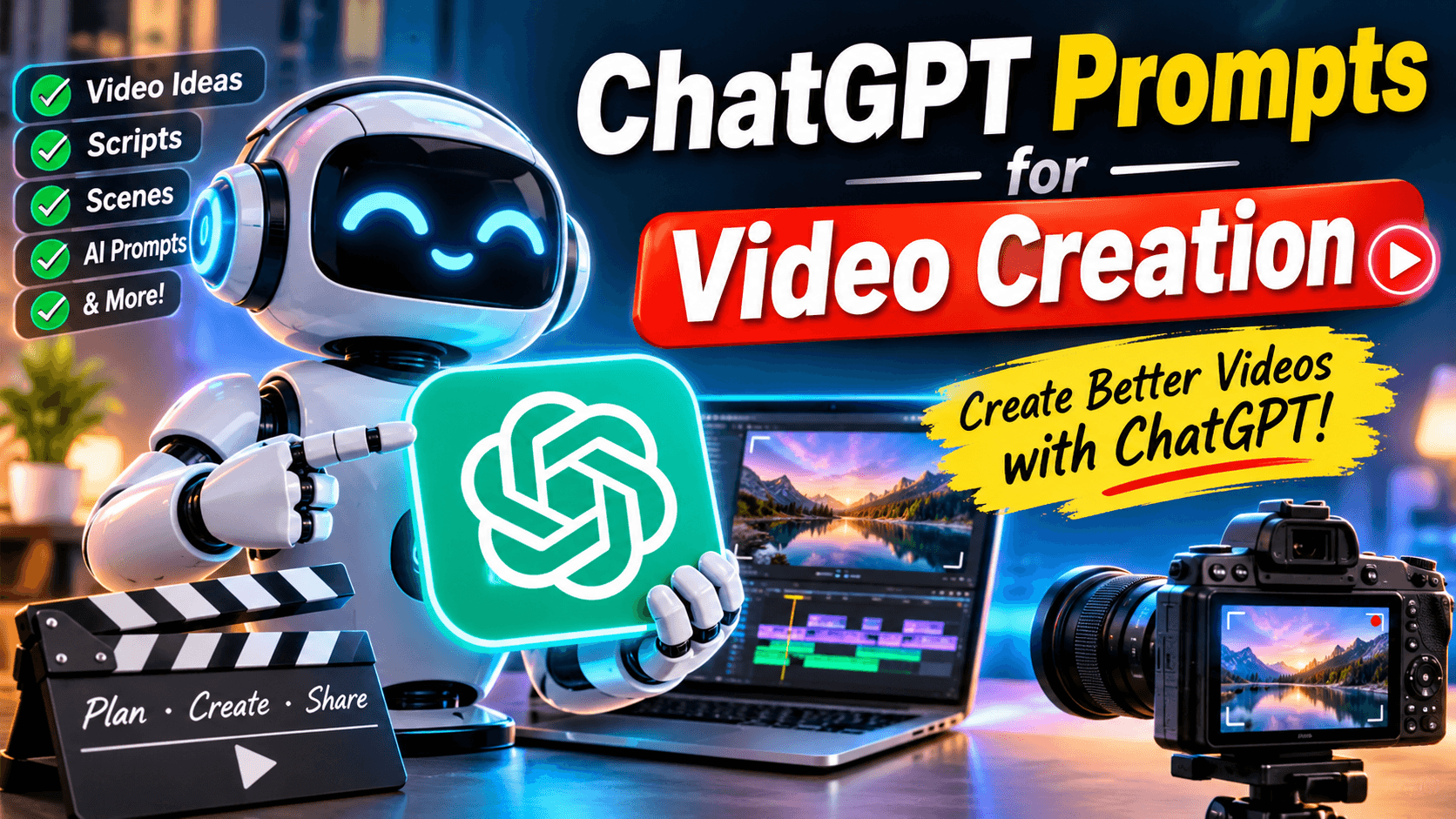
This is where ChatGPT prompts for video creation become useful. ChatGPT can help you develop video ideas, write scripts, create scene descriptions, generate voiceovers, and prepare detailed prompts for AI video generators.
You do not need to be a professional filmmaker to start creating interesting videos. With a clear instruction, ChatGPT can help turn a simple idea into a complete video production plan.
For example, you can ask ChatGPT to create a 30-second advertisement, write a horror story, develop a YouTube Shorts script, or describe a realistic cinematic scene for an AI video generator.
In this guide, you will discover 30 practical ChatGPT prompts for video creation. You can copy them, change the details, and use them for your own projects.
What Are ChatGPT Prompts for Video Creation?
ChatGPT prompts for video creation are instructions that tell ChatGPT what type of video content you want to produce.
A prompt can include information about the video topic, audience, duration, style, characters, scenes, camera movements, and voiceover.
For example, instead of writing:
"Give me a video idea."
You can write:
"Generate five creative YouTube Shorts ideas about mysterious animals. Each idea should have an interesting opening, an exciting middle, and a surprising ending. Keep each video under 45 seconds."
The second instruction provides more details, so ChatGPT can produce a more useful result.
These prompts can support several types of video projects, including:
- YouTube videos and Shorts
- TikTok videos
- Instagram Reels
- AI-generated movies
- Educational videos
- Product advertisements
- Storytelling videos
- Animated videos
- Faceless YouTube content
30 Best ChatGPT Prompts for Video Creation
Below are 30 practical prompts for different video creation tasks. Replace the words inside brackets with your own topic or requirements.
1. YouTube Video Ideas Prompt
Use this prompt when you do not know what video to create next.
Prompt:
"Act as a professional YouTube content strategist. Generate 20 unique and engaging video ideas about [your niche]. Focus on topics that can attract viewers, solve common problems, and encourage people to watch until the end. Give each idea a catchy title and a short description."
2. YouTube Shorts Script Prompt
Short videos need a strong opening and a clear message.
Prompt:
"Write a 30-second YouTube Shorts script about [topic]. Start with a powerful hook in the first three seconds. Make the script interesting, easy to understand, and suitable for a general audience. Include a short ending that encourages viewers to comment or subscribe."
3. Cinematic Video Script Prompt
This prompt is useful for filmmakers and AI video creators.
Prompt:
"Create a cinematic short film script about [story idea]. Divide the story into eight scenes. For each scene, provide visual descriptions, character actions, camera angles, lighting, background details, and dialogue. Maintain character consistency throughout the story."
4. AI Video Generation Prompt
Use this instruction to create descriptions for AI video tools.
Prompt:
"Write a detailed AI video generation prompt showing [subject] in [location]. Describe the environment, lighting, camera movement, subject movement, atmosphere, and visual style. Make the result realistic and cinematic. Avoid unnecessary visual elements."
5. Video Advertisement Prompt
This is useful for promoting websites, products, and online services.
Prompt:
"Act as a professional advertising scriptwriter. Create a 30-second video advertisement for [product or website]. Start with an attention-grabbing question, explain the main benefits, show how it helps users, and finish with a strong call to action. Make the advertisement natural and persuasive."
6. Faceless YouTube Video Prompt
Prompt:
"Create a complete faceless YouTube video script about [topic]. Include a strong introduction, five main sections, interesting facts, voiceover text, suggested stock footage, background music ideas, and a closing message. The video should be approximately five minutes long."
7. Horror Video Story Prompt
Prompt:
"Write a suspenseful horror short film about [story idea]. Divide it into six scenes. Build tension gradually, use mysterious visual details, and create a surprising ending. Include camera directions, sound effects, and dialogue."
8. AI Animation Video Prompt
Prompt:
"Create a short animated video story about [character or topic]. Include the main character's appearance, personality, environment, actions, and dialogue. Divide the story into five scenes and keep the animation style consistent."
9. Educational Video Prompt
Prompt:
"Write an educational video script explaining [topic] to beginners. Use simple language, practical examples, and clear explanations. Include an introduction, important points, visual suggestions, and a short conclusion."
10. Product Showcase Video Prompt
Prompt:
"Create a professional product showcase video for [product]. Describe the opening shot, product close-ups, camera movements, background, lighting, product features, and final promotional scene. Use a premium commercial style."
11. Viral Video Hook Prompt
Prompt:
"Generate 20 attention-grabbing opening hooks for a video about [topic]. Keep each hook short, interesting, and curiosity-driven. Make them suitable for YouTube Shorts, TikTok, and Instagram Reels."
12. AI Animal Video Prompt
Prompt:
"Create a realistic and entertaining AI video concept featuring [animal] in [location]. Describe the animal's appearance, movement, environment, camera angles, and interactions. Use a visually engaging cinematic style."
13. Fantasy Movie Prompt
Prompt:
"Develop a fantasy movie scene featuring [character] in a magical world. Include detailed environmental descriptions, dramatic lighting, character actions, camera movements, special effects, and cinematic atmosphere."
14. Dragon Story Video Prompt
Prompt:
"Write an emotional fantasy story about a baby dragon that loses its family and is raised by a mysterious wolf. Divide the story into ten scenes. Include consistent character descriptions, emotional moments, cinematic visuals, and a powerful ending."
15. Motivational Video Prompt
Prompt:
"Write a 60-second motivational video script about [topic]. Start with a powerful statement, include an inspiring message, suggest emotional background music, and finish with a memorable closing line."
16. Travel Video Prompt
Prompt:
"Create a cinematic travel video script about [destination]. Include beautiful location shots, local culture, food, activities, camera movements, and an engaging voiceover. Make the video suitable for social media."
17. Cooking Video Prompt
Prompt:
"Write a short cooking video script showing how to prepare [dish]. Include ingredient shots, preparation steps, cooking scenes, close-up food shots, and a final presentation. Make it suitable for a 45-second social media video."
18. Funny Video Prompt
Prompt:
"Generate a funny short video concept about [topic]. Include an unexpected situation, entertaining character reactions, simple dialogue, and a humorous ending. Keep the story suitable for a 30-second video."
19. AI Music Video Prompt
Prompt:
"Create a visual concept for a music video featuring [music genre or theme]. Describe the locations, characters, clothing, lighting, camera movements, and scene transitions. Match the visuals to the mood and energy of the music."
20. Documentary Video Prompt
Prompt:
"Write a documentary-style video script about [subject]. Include an informative introduction, interesting facts, suggested visuals, narration, and a conclusion. Keep the information accurate and engaging."
21. Instagram Reels Prompt
Prompt:
"Generate ten creative Instagram Reels ideas about [niche]. Each idea should include a short title, opening hook, video concept, suggested text overlay, and ending."
22. TikTok Video Prompt
Prompt:
"Create a creative TikTok video script about [topic]. Make the opening interesting, use simple dialogue, suggest quick scene changes, and include a memorable ending. Keep it under 30 seconds."
23. Explainer Video Prompt
Prompt:
"Create a simple explainer video about [topic]. Break the information into short scenes. For each scene, include narration, suggested graphics, text overlays, and animation ideas. Make the explanation easy for beginners."
24. Before and After Video Prompt
Prompt:
"Create a before-and-after transformation video concept for [subject]. Describe the original condition, transformation process, important visual details, transition effects, and final result."
25. Video Voiceover Prompt
Prompt:
"Write a natural voiceover script for a video about [topic]. Use conversational language, short sentences, and an engaging tone. Match the narration to a video duration of [time]."
26. Scene-by-Scene Video Prompt
Prompt:
"Convert this story into a detailed scene-by-scene video production plan: [paste story]. For each scene, provide the visual prompt, character actions, camera angle, camera movement, lighting, sound effects, and voiceover."
27. Consistent Character Prompt
Prompt:
"Create a detailed character sheet for [character name]. Describe facial features, hairstyle, clothing, body type, age appearance, personality, and unique identifying details. Use the same character appearance in every scene of the video."
28. YouTube Thumbnail Idea Prompt
Prompt:
"Generate five creative YouTube thumbnail concepts for a video titled [video title]. Include the main subject, background, facial expression, composition, color contrast, and short thumbnail text. Make each concept easy to understand at a small size."
29. Video Editing Prompt
Prompt:
"Act as a professional video editor. Suggest an editing plan for a video about [topic]. Include scene order, transitions, text overlays, sound effects, background music, pacing, and important moments where visual effects can improve the video."
30. Complete AI Video Production Prompt
Prompt:
"Act as an experienced AI filmmaker and video production expert. Create a complete production plan for a video about [topic]. Include the following:
- Video title and concept.
- Main character descriptions.
- Complete script.
- Scene-by-scene image prompts.
- Scene-by-scene video generation prompts.
- Camera angles and movements.
- Voiceover for every scene.
- Background music and sound effects.
- Editing instructions.
- Final video description and social media captions.
Keep the characters, locations, and visual style consistent throughout the project."
How to Write Better ChatGPT Prompts for Video Creation
Getting useful results from ChatGPT depends on how clearly you explain your requirements. A short prompt can work, but detailed instructions often produce better starting material.
Here are some useful tips.
1. Explain Your Video Topic
Start by telling ChatGPT exactly what you want to create. Instead of saying "make a video," describe the subject and purpose.
For example, explain whether you want an educational video, a short film, a product advertisement, or an entertaining social media clip.
2. Mention the Video Duration
Always provide an estimated duration. A 15-second Reel needs a different script from a ten-minute YouTube video.
3. Describe Your Target Audience
Tell ChatGPT who will watch the video. Your content may be designed for children, students, business owners, filmmakers, or general viewers.
4. Request Scene-by-Scene Details
For AI video production, ask ChatGPT to divide the script into individual scenes. This makes it easier to create images and video clips separately.
5. Include Visual Instructions
Describe the camera angle, lighting, environment, character movement, and visual style. These details help create more specific AI video prompts.
6. Improve the Results Step by Step
You do not need to accept the first answer. Ask ChatGPT to improve the opening, change the dialogue, add more details, or make the ending stronger.
How to Use ChatGPT Prompts with AI Video Generators
ChatGPT can help you prepare scripts and visual descriptions, while AI video generators can turn suitable prompts or images into video clips.
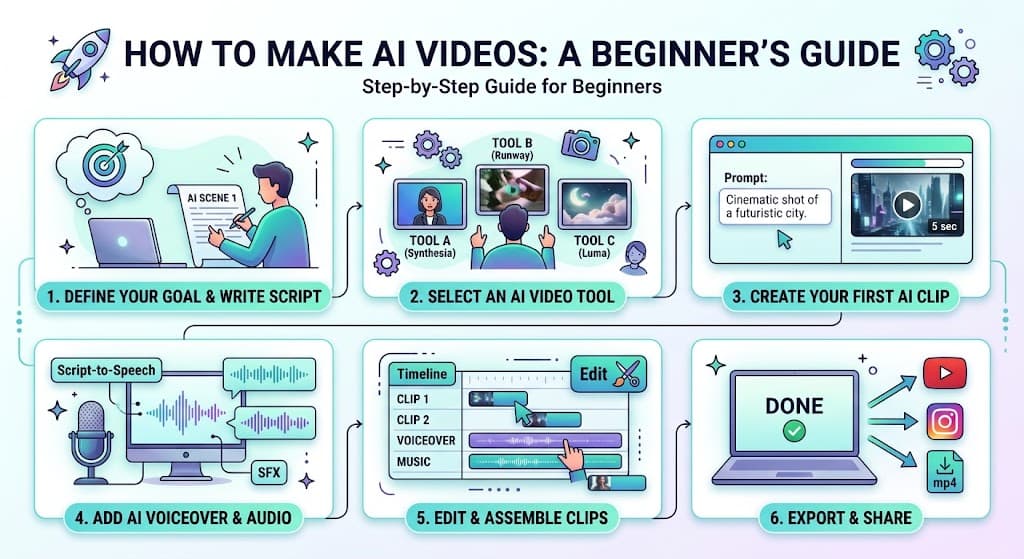
Follow these steps to organize your workflow.
Step 1: Choose Your Video Idea
Select a topic such as a fantasy story, animal video, advertisement, or educational short.
Step 2: Generate the Script
Give ChatGPT your topic and ask it to write a complete script with a beginning, middle, and ending.
Step 3: Create Character Descriptions
If your video includes characters, prepare detailed character descriptions. This can help maintain a consistent appearance across scenes.
Step 4: Generate Image Prompts
Ask ChatGPT to convert each scene into an image generation prompt. Use these prompts to create reference images where needed.
Step 5: Generate Video Clips
Use the visual descriptions or reference images with a suitable AI video generator. Review each result and make adjustments.
Step 6: Add Voiceovers and Sound
Prepare narration, dialogue, background music, and sound effects. Make sure the audio matches the action on screen.
Step 7: Edit and Export
Arrange the clips in the correct order, add captions, adjust the timing, and export your finished video.
Common Mistakes to Avoid When Using ChatGPT for Video Creation
Even a good prompt can produce results that need improvement. Avoid these common mistakes:
- Writing unclear instructions: Always explain the video topic and desired result.
- Ignoring character consistency: Reuse the same character description across scenes.
- Making scripts too long: Match the script length to your video duration.
- Forgetting the opening hook: Give viewers a reason to continue watching.
- Using generic visual descriptions: Include specific locations, lighting, actions, and camera movements.
- Skipping fact-checking: Review educational, historical, and informational content before publishing.
- Ignoring copyright: Check the rights for music, images, footage, and other assets used in your videos.
Frequently Asked Questions
Can ChatGPT create videos directly?
ChatGPT can help create video scripts, story ideas, scene descriptions, and AI video prompts. Actual video generation depends on the video generation tools and features available to you.
What are the best ChatGPT prompts for YouTube Shorts?
The best prompts explain the topic, target audience, video duration, opening hook, main message, and ending. Ask ChatGPT to create a short script with clear scenes and voiceover.
Can beginners use ChatGPT for video creation?
Yes. Beginners can use ChatGPT to develop ideas, prepare scripts, write narration, and organize their video production process without advanced writing skills.
How do I create cinematic AI videos with ChatGPT?
Ask ChatGPT to create a detailed scene-by-scene plan. Include camera movements, lighting, environment, character actions, and visual style. Then use the generated prompts with an AI video generator.
Are ChatGPT prompts for video creation free?
You can write and use many prompts with ChatGPT's free access. Available features and usage limits depend on your account and the current product offering.
Can I use ChatGPT prompts for commercial videos?
You can use ChatGPT to help develop commercial video ideas and scripts. However, check the terms of the AI tools and the usage rights for all music, images, footage, and other assets included in your final video.
Final Thoughts
ChatGPT prompts for video creation can make video planning easier and help creators develop better ideas. From YouTube Shorts and cinematic films to product advertisements and educational videos, the right instructions can turn a simple concept into a complete production plan.
The 30 prompts in this guide provide a useful starting point. You can customize them according to your niche, audience, and video style.
If you want to explore more creative prompts, AI tools, and ready-to-use resources, visit Qissanect.com. It is a useful place to discover prompt ideas and explore ways to improve your AI content creation workflow.
Start with one prompt, experiment with different instructions, and develop a video creation process that works for you.