How to Make AI Videos: A Complete Step by Step Guide for Beginners
- 15 min read
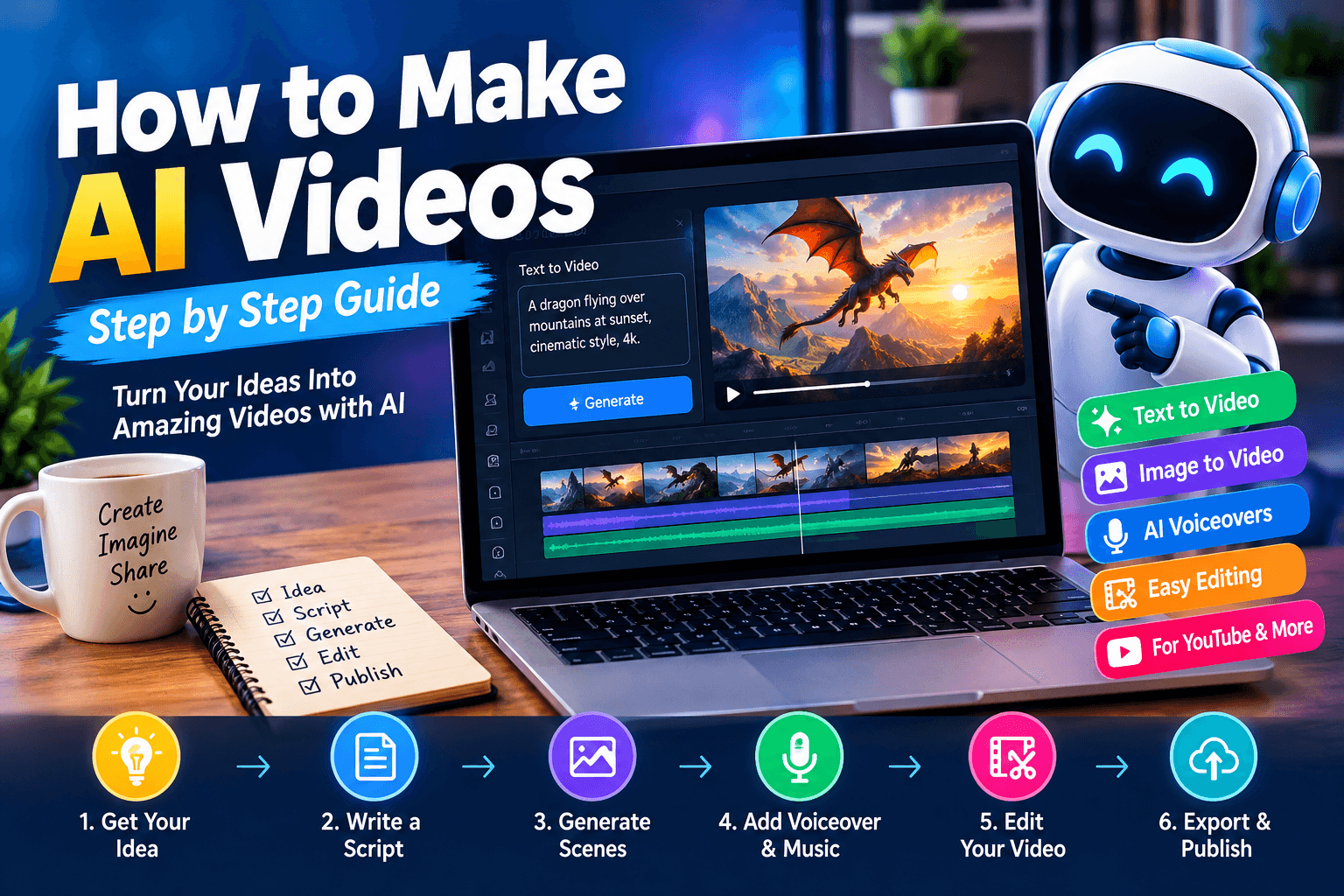
AI video creation is changing how people make content for the internet. You no longer need an expensive camera, a professional studio, or advanced editing skills to produce an engaging video. With the right tools and a clear idea, you can turn a simple text description into a video in just a few steps.
Learning how to make AI videos can help content creators, bloggers, business owners, teachers, and beginners save time while exploring new creative ideas. You can create cinematic stories, educational clips, product advertisements, animated characters, travel videos, and short social media content.
However, good results do not come from pressing a single button. You need to choose the right idea, write a clear prompt, plan your scenes, and edit the final video carefully. This guide explains the entire process in simple language.
What Are AI Videos?
AI videos are videos created or edited with the help of artificial intelligence. These tools can generate moving scenes from text descriptions, animate still images, create voiceovers, produce digital presenters, and help with editing.
For example, you could enter a prompt describing a dragon flying over a snowy mountain at sunset. An AI video generator may turn that description into a short cinematic clip.
Other tools can animate a photograph, generate a talking avatar, or convert a written script into a video with narration and background visuals.
AI does not remove the need for creative thinking. Instead, it gives you new ways to bring your ideas to life.
What Do You Need to Make AI Videos?
You can start with a computer or smartphone and an internet connection. Most beginner friendly tools work through a web browser, although some offer mobile applications or desktop software.
Before starting, prepare these basic items:
- A video idea: Decide what you want your audience to watch.
- A script: Write the main message, story, or narration.
- An AI video generator: Choose a tool that supports your preferred video style.
- Images or visual prompts: Prepare references if your workflow uses image to video generation.
- A voiceover: Use your own voice or a suitable AI generated voice.
- A video editor: Arrange scenes, add captions, adjust audio, and export the final result.
You do not need to purchase every tool. Start with free plans or trial options where available, and check their usage limits, watermarks, and commercial licensing rules before publishing your work.
Step 1: Choose the Right Idea for Your AI Video
The first step is choosing a topic that suits your audience and the platform where you want to publish.
If you are creating YouTube Shorts, short stories, surprising facts, tutorials, and visually interesting scenes can work well. For business websites, product demonstrations and educational videos may be more useful. Travel creators can produce destination guides, while educators can explain difficult topics through simple animated scenes.
Try to choose an idea that can be explained clearly in a short amount of time.
For example, instead of making a general video about wildlife, create a story about a baby elephant that becomes separated from its family and finds its way home.
This idea gives you a character, a problem, and a clear ending. It also makes it easier to plan the scenes.
Before generating anything, answer three questions:
- Who will watch the video?
- What should viewers learn, feel, or remember?
- What makes the video interesting enough to watch until the end?
These answers will guide your script, visuals, and editing decisions.
Step 2: Write a Script Before Generating Clips
A script gives your AI video a clear structure. Without one, you may generate attractive clips that do not connect into a meaningful story.
For a short video, start with a strong opening, introduce the main idea, develop the action, and finish with a useful conclusion or memorable moment.
Here is a simple example for a fictional wildlife video.
Video title: A Lost Baby Elephant Finds Its Family
Opening: A tiny elephant wakes up alone in a vast green forest.
Middle: It walks past a river, hears strange sounds, and searches for familiar tracks.
Climax: A sudden storm forces the baby elephant to find shelter beneath a rocky cliff.
Ending: At sunrise, the elephant hears its mother's call and runs toward the herd.
This structure gives you a clear sequence of events. You can now turn each section into a separate scene.
Keep the narration natural. Short sentences are often easier to understand, especially when viewers are watching on a phone.
Step 3: Select an AI Video Generator
Different AI video tools have different strengths. Some are designed for cinematic text to video generation, while others focus on image animation, avatars, or complete marketing videos.
Examples include Runway, OpenAI Sora where available, Google Veo where available, Kling AI, and Adobe Firefly's video features. Features, pricing, access, and usage limits can change, so check each provider's current offering before choosing one.
For your first project, select a tool that supports the type of video you want to create.
A cinematic story may require realistic motion and camera controls. A tutorial may need screen recordings and captions. A product advertisement may benefit from image animation and clear text overlays.
Do not choose a tool only because it is popular. Choose one that gives you the controls needed for your specific project.
Step 4: Learn How to Write Better AI Video Prompts
The prompt is one of the most important parts of AI video creation. It tells the generator what to show and helps guide the appearance, movement, lighting, and atmosphere of the scene.
A weak prompt might say:
"Make a video of a dragon."
This leaves many details open to interpretation.
A more useful prompt would be:
"Create a cinematic fantasy scene featuring a large emerald green dragon flying above a misty mountain valley at sunrise. Its wings move naturally as clouds drift between the peaks. Golden sunlight reflects off its scales. The camera follows the dragon from a low angle, with realistic motion, detailed textures, and a dramatic atmosphere. No text or logos."
This prompt describes the subject, environment, movement, lighting, camera angle, and visual style.
A useful AI video prompt can include the following elements:
- Subject: Who or what appears in the scene?
- Action: What is happening?
- Environment: Where does the action take place?
- Camera movement: Is the camera tracking, panning, zooming, or remaining still?
- Lighting: Is the scene bright, dark, soft, or dramatic?
- Visual style: Should it look realistic, animated, documentary like, or cinematic?
- Consistency: Which details must remain the same throughout the scene?
Avoid adding too many unrelated actions to a single prompt. A focused description often makes it easier to obtain a usable clip.
Step 5: Create Consistent Characters and Scenes
One common challenge in AI filmmaking is character consistency. A character may have different clothing, facial features, body proportions, or colors in different clips.
This can make a story feel disconnected.
To reduce this problem, create a character reference before generating your scenes. Describe the character's age, appearance, clothing, colors, body shape, and distinctive features.
For example:
Character reference: A young fantasy explorer with short dark brown hair, a weathered green jacket, brown trousers, a small leather backpack, and a silver compass. The character has the same facial features and clothing in every scene.
Use this description in relevant prompts. If your tool supports reference images, reusable character references, or fixed seeds, use those features where appropriate.
For a dragon story, specify its color, horn shape, wing structure, eye color, and size. Repeat the essential details in every scene where the dragon appears.
You should also plan how one scene leads into the next. If a character exits a forest on the right side of the frame, the following scene should not unexpectedly place the character on the opposite side without a reason.
Consistency will not always be perfect, but careful planning can make the final video feel much more professional.
Step 6: Generate the Video Scene by Scene
Instead of asking an AI generator to create an entire long film at once, start by generating short clips for individual scenes.
For example, a 45 second story might contain six scenes of approximately seven seconds each, plus a few seconds for transitions or an ending.
Your scene plan could look like this:
Scene | Visual action | Purpose |
|---|---|---|
1 | A dragon hatches inside a hidden cave | Introduce the main character |
2 | The young dragon explores a green forest | Establish the setting |
3 | The dragon encounters a wolf | Introduce a relationship |
4 | A storm approaches the forest | Create tension |
5 | The dragon protects the wolf from falling branches | Show character growth |
6 | Both characters watch the sunrise together | Provide an emotional ending |
Generate each scene separately and review the results before continuing.
If a clip contains distorted movement, inconsistent details, or an unexpected object, revise the prompt and try again. Sometimes a small change in the action or camera description can improve the result.
Keep your strongest clips and discard the ones that do not support the story.
Step 7: Add Voiceovers and Background Music
A good voiceover helps viewers follow the story and understand the purpose of the video.
You can record your own narration or use a text to speech tool. When choosing an AI voice, consider its clarity, pronunciation, emotional tone, and suitability for your audience.
Write narration that matches what viewers see. If the video shows a character walking through a forest, the voiceover should not describe an unrelated event.
Music can also improve the viewing experience. Gentle music may suit an educational video, while dramatic orchestral sounds may suit a fantasy scene.
Keep the music below the narration so the words remain easy to hear. Add sound effects only when they support the action.
Make sure you have permission to use the music, voice, and sound effects in your intended publication. Check the applicable license terms, particularly if you plan to monetize the video.
Step 8: Edit the Clips Into a Complete Video
AI generated clips are raw material. Editing turns them into a finished video.
Use a video editor that supports your needs, such as CapCut, DaVinci Resolve, Adobe Premiere Pro, or another suitable editing application.
Start by placing your clips in the correct order. Remove unnecessary pauses, repeated actions, and scenes that do not add value.
Next, add narration, music, captions, and transitions. Keep transitions simple unless a particular effect supports the story.
For short vertical videos, a 9:16 aspect ratio is commonly used. Standard widescreen YouTube videos generally use a 16:9 aspect ratio. Choose the format before generating your visuals whenever possible.
Pay attention to the opening seconds. Viewers should quickly understand the topic or see something that makes them curious.
Finally, watch the entire video before exporting it. Check the sound levels, spelling, scene order, visual quality, and timing.
Step 9: Export and Publish Your AI Video
Once the edit is complete, export the video using settings suitable for your chosen platform.
For many online projects, 1080p resolution is a practical starting point when the source material supports it. Choose a suitable frame rate and encoding setting based on your editor and platform requirements.
Before publishing, review these details:
- Is the video clear on a mobile screen?
- Can viewers understand the narration?
- Are captions readable?
- Does the opening match the video's main promise?
- Are there any visible AI generation errors?
- Do you have the necessary rights to the included assets?
- Have you followed the platform's rules for synthetic or altered media disclosures?
Use an accurate title, a relevant thumbnail, and a description that explains what viewers will see. Avoid misleading claims or unrelated keywords.
If the video contains realistic AI generated people, events, or other synthetic content, check the current disclosure rules of the platform where you intend to publish it.
Best Types of AI Videos to Create
AI video tools can support many different content styles. The right choice depends on your skills, interests, audience, and available time.
1. AI Storytelling Videos
Create short fictional stories involving animals, fantasy characters, mysteries, or emotional moments. Plan a beginning, a problem, and a satisfying ending to give viewers a reason to keep watching.
2. AI Educational Videos
Explain science, history, technology, language, or everyday topics using generated scenes and narration. Check factual claims carefully because AI generated visuals can show things that never happened.
3. AI Product Advertisement Videos
Present a product's features, benefits, and use cases. Use accurate product references and review the generated visuals carefully so the video does not misrepresent the real product.
4. AI Travel Videos
Create visual introductions to destinations, landscapes, and travel themes. Clearly distinguish generated scenes from genuine footage when the difference could affect viewers' understanding.
5. AI Cinematic Videos
Use detailed prompts, consistent characters, controlled camera movement, and sound design to create fantasy or science fiction sequences.
6. AI Social Media Videos
Make short tutorials, motivational clips, explainers, and entertaining visual experiments for platforms such as YouTube Shorts, Instagram Reels, and TikTok.
Choose one format to begin with. Improving one repeatable video style is often more useful than constantly changing your workflow.
Common Mistakes to Avoid When Making AI Videos
Even a powerful video generator cannot guarantee a polished result. Avoid these common mistakes to improve your workflow.
Writing vague prompts: Describe the action and setting clearly rather than relying on a few broad words.
Generating too much content at once: Build the video from manageable scenes so you can review each result.
Ignoring character consistency: Keep reference descriptions and images available throughout the project.
Using too many effects: Excessive transitions, visual filters, and sound effects can distract viewers from the main message.
Skipping the editing stage: Generated clips may have awkward endings, inconsistent pacing, or unwanted details. Review and refine them before publishing.
Ignoring copyright and permissions: Verify the terms of your AI tools, stock assets, music, voices, and reference material.
Publishing without review: Always watch the exported video from beginning to end, preferably on the device your audience is likely to use.
How to Make AI Videos for Free
You can begin creating AI videos without paying for an expensive production setup. Some tools provide free credits, limited generation features, or free editing software.
Start with a short script and generate only the scenes you need. Use free editing software to arrange the clips, add your own narration, and include captions.
Before choosing a free generator, check its limits. Free access may include watermarks, restricted export quality, limited credits, slower processing, or restrictions on commercial use.
A practical beginner workflow is to write a script, generate a few short clips with an available free tier, record a voiceover, edit everything together, and export the result.
If a particular tool does not provide enough free generations, try simplifying the scene or using a still image with gentle motion instead of generating every shot from scratch.
The goal is to make a useful video with the resources available to you, not to collect the largest number of AI subscriptions.
Tips for Getting Better Results From AI Video Tools
Improvement comes from testing and learning what works for your content.
First, keep your prompts organized. Save successful prompts so you can reuse their structure in future projects.
Second, change one or two details when a result is poor. If you change the subject, lighting, camera angle, and action all at once, it becomes harder to determine which adjustment helped.
Third, plan your shots before generating them. A wide shot can establish the environment, a medium shot can show the character, and a close up can highlight an important expression or object.
Fourth, keep narration concise and make sure it fits the available footage. If the narration is too long, shorten the script or generate additional scenes.
Finally, review audience feedback and retention data after publishing. If viewers leave early, consider improving the opening, simplifying the message, or removing slow sections.
Frequently Asked Questions
Can beginners make AI videos?
Yes. Beginners can use text to video generators, image animation tools, AI voiceovers, and simple editing software. Starting with a short project makes the learning process easier.
Do I need a powerful computer to make AI videos?
Not always. Many AI video generators run online, so the generation process takes place on the provider's servers. Editing high resolution footage locally may still require a capable computer.
Can I make AI videos for YouTube?
Yes. You can create educational videos, fictional stories, explainers, and other formats. Follow YouTube's current monetization, originality, copyright, and synthetic content disclosure policies.
How long does it take to create an AI video?
A short video may take less than an hour if the idea is simple and the tools work well. More complex projects can take several hours or longer because of prompt testing, scene generation, editing, and quality checks.
Can AI videos earn money?
They can, but earnings are not guaranteed. Revenue depends on factors such as audience demand, originality, production quality, platform eligibility, advertiser suitability, and your ability to build a regular audience.
What is the difference between text to video and image to video?
Text to video generates footage from a written description. Image to video uses an existing image as a starting point and creates motion from it. Some workflows combine both methods for greater visual consistency.
Conclusion
Learning how to make AI videos is easier when you follow a clear process. Begin with a focused idea, write a script, choose an appropriate generator, and divide the project into short scenes. Use detailed prompts to guide the visuals, maintain consistent characters, and add narration and music where they improve the experience.
The final editing stage is just as important as generation. Remove weak clips, check the sound, add readable captions, and review the entire video before publishing.
You do not need to master every AI tool at once. Create one short video, learn from the results, and improve your next project. With regular practice and thoughtful planning, you can develop a repeatable workflow for producing useful and engaging AI videos.