Master AI Prompts: How to Write Better Prompts for ChatGPT and Other AI Tools
- 14 min read
Artificial intelligence tools can help you write articles, create images, make videos, solve problems, and complete many daily tasks. However, the quality of their results often depends on how you ask questions.
A simple prompt may give you a basic answer. A well written prompt can help an AI tool understand your goal, follow your instructions, and produce a more useful result.
This is where master AI prompts become helpful.
A master AI prompt is a detailed instruction that tells an AI tool what to do, how to do it, and what kind of result you expect. It can include a role, a task, background information, rules, and an output format.
For example, instead of asking ChatGPT to write an article, you can provide a master prompt that explains the topic, target audience, writing style, article structure, and SEO requirements.
This guide explains how master AI prompts work, how to create them, and how to use ready made prompt examples for writing, research, image generation, video creation, and other tasks.
What Are Master AI Prompts?
Master AI prompts are detailed instructions designed to guide an AI tool through a specific task.
They are different from short questions because they provide more information about the expected result.
A basic prompt might be:
"Write an article about online business."
A master AI prompt could be:
"Act as an experienced content writer. Write a beginner friendly article about online business ideas. Use simple English, explain each idea with practical examples, include an introduction and conclusion, and organize the article with clear headings. Avoid unsupported claims and keep the advice useful for readers with limited budgets."
The second prompt gives the AI a clearer direction.
Master prompts can be used for many purposes, including:
- Writing blog posts and website content.
- Creating social media captions.
- Generating images and video scenes.
- Learning new subjects.
- Planning business projects.
- Creating marketing materials.
- Reviewing and improving existing content.
The main benefit is consistency. Once you create a useful master prompt, you can reuse it for similar tasks by changing the topic or other details.
Why Are Master AI Prompts Useful?
Master AI prompts help users get more control over AI generated content.
1. They Provide Clear Instructions
AI tools need to understand what you want. A prompt that explains the task, audience, and purpose can reduce confusion.
For example, if you need an article for beginners, your prompt should tell the AI to explain difficult terms and use simple examples.
2. They Save Time
You do not need to explain your writing preferences every time you start a new task.
You can save a master prompt and reuse it whenever you need similar content.
3. They Improve Content Structure
A master prompt can request a specific structure, such as:
- A clear title.
- An introduction.
- Main sections with headings.
- Examples or practical steps.
- A conclusion.
This can make the output easier to read and edit.
4. They Help Maintain a Consistent Style
If you publish content on a website, consistency matters.
You can use a master prompt to request the same tone, reading level, formatting rules, and writing style across different articles.
However, you should still review every result. A prompt cannot guarantee that an AI tool will follow every instruction perfectly.
The Main Parts of a Master AI Prompt
A good master prompt does not need to be extremely long. It needs the right information.
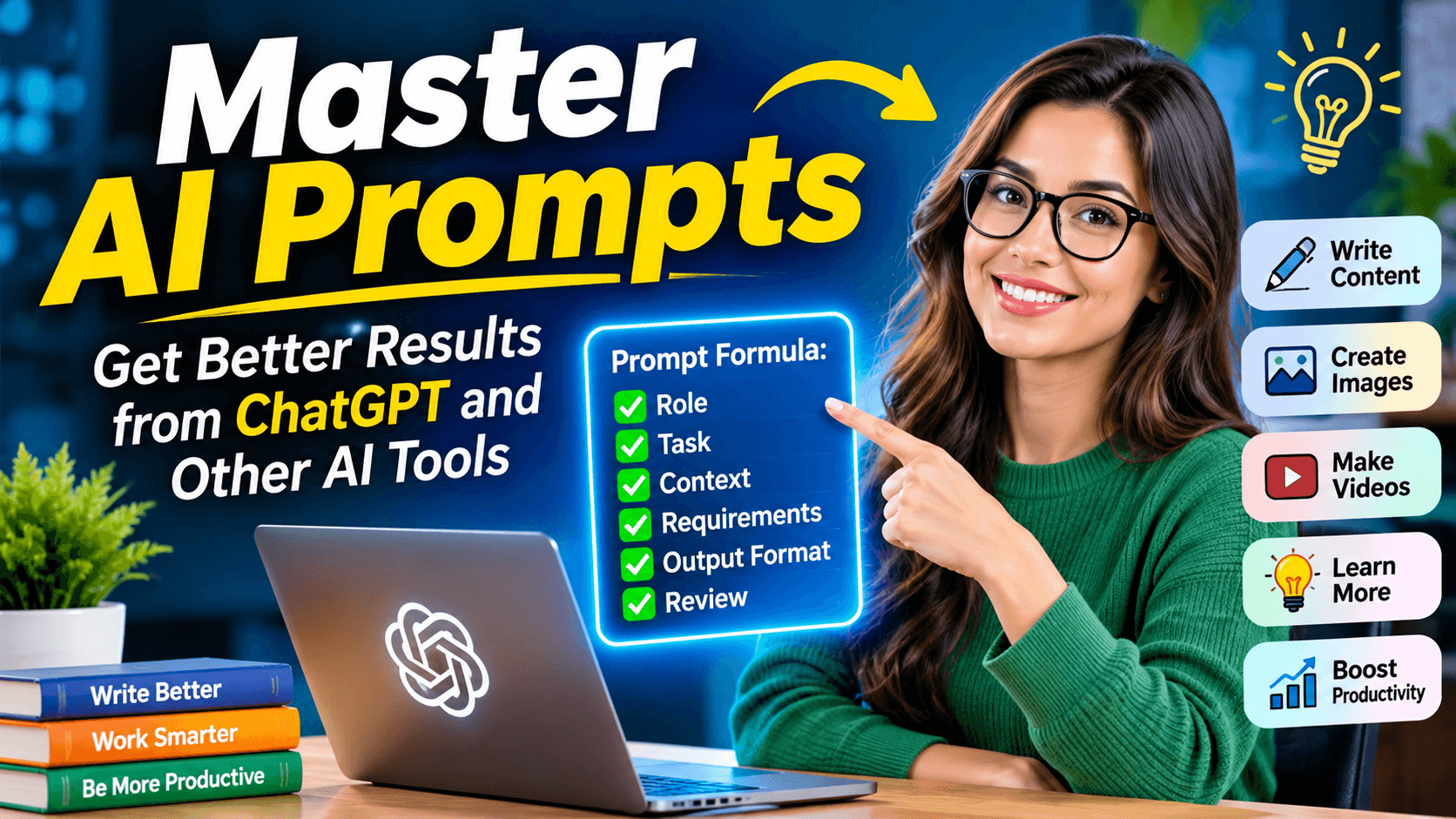
Here are six useful parts to include.
1. Role
Tell the AI what kind of assistant you want it to act as.
Examples:
- Act as a professional content writer.
- Act as an SEO content editor.
- Act as a creative video scriptwriter.
- Act as an AI image prompt specialist.
- Act as a patient and clear tutor.
The role helps set the direction of the response.
2. Task
Explain exactly what the AI should do.
For example:
"Write a detailed article about free AI image generators."
Avoid vague instructions such as "Make something good" because they do not explain the required result.
3. Context
Provide background information that helps the AI understand the task.
For an article, context may include the website topic, target audience, main keyword, and reader's needs.
For an image prompt, context may include the subject, setting, mood, and intended use.
4. Requirements
List the rules the AI should follow.
Examples:
- Use simple English.
- Keep the tone friendly and professional.
- Include practical examples.
- Avoid repeated information.
- Explain technical terms.
- Do not invent facts or statistics.
5. Output Format
Explain how you want the result to appear.
You might request:
- An article with headings.
- A numbered tutorial.
- A table comparing different options.
- A video script divided into scenes.
- A list of image prompts.
The output format makes the response easier to use.
6. Review Instructions
Tell the AI to check its work before presenting the final answer.
For example:
"Before completing the article, check that the content answers the main question, follows the requested structure, avoids repeated points, and uses clear language."
This can improve the result, although you should still perform your own review.
A Universal Master AI Prompt Template
The following template works as a starting point for many AI tasks. You can copy it into ChatGPT or another AI assistant and replace the information inside the brackets.
Master Prompt:
"Act as a [ROLE] with experience in [SUBJECT].
Your task is to [DESCRIBE THE TASK].
The target audience is [AUDIENCE]. The main goal is to [EXPECTED RESULT].
Use the following context: [BACKGROUND INFORMATION].
Follow these requirements:
- Use clear and natural language.
- Focus on the user's main goal.
- Include practical examples where useful.
- Avoid unnecessary repetition and unsupported claims.
- Follow the requested tone and structure.
- Ask a question if essential information is missing.
Present the result in this format: [OUTPUT FORMAT].
Before providing the final result, review it for clarity, accuracy, completeness, and compliance with the instructions."
You can use this template for writing, research, marketing, education, and creative work.
Best Master AI Prompts for Different Tasks
Here are some practical master prompts you can use for common AI activities.
1. Master AI Prompt for Blog Writing
This prompt can help you prepare website articles and blog posts.
"Act as an experienced blog writer and content editor.
Write an informative article about [TOPIC] for [TARGET AUDIENCE].
The article should answer the main questions readers have about this topic. Use a clear title, an engaging introduction, useful headings, and a conclusion.
Use simple English and explain technical terms in a way that beginners can understand.
Include relevant examples and practical information. Avoid filler, repeated ideas, exaggerated claims, and information that cannot be supported.
Use the following SEO details:
Main keyword: [MAIN KEYWORD]
Secondary keywords: [SECONDARY KEYWORDS]
Search intent: [SEARCH INTENT]
Write original content that provides value to readers. Do not force keywords into sentences.
After the article, provide a short meta description and suggest a suitable category."
This prompt is useful for informational articles, tutorials, product guides, and educational content.
2. Master AI Prompt for SEO Keyword Research
Keyword research helps you understand what people search for online.
Use this prompt to organize keyword ideas:
"Act as an SEO keyword research specialist.
My website is about [WEBSITE NICHE], and my target audience is [COUNTRY OR AUDIENCE].
Find relevant keyword ideas related to [TOPIC].
Organize the keywords into informational, commercial, transactional, and question based groups.
For each keyword, explain its search intent and suggest a suitable content type.
If reliable keyword data is available, include search volume, keyword difficulty, and the country used for the data.
Do not invent search volumes, traffic estimates, or keyword difficulty scores. Clearly identify estimates and explain when live data is unavailable.
Prioritize keywords that closely match my website and provide useful opportunities for readers."
An AI assistant can suggest keyword ideas and group them by intent. However, actual search volume and keyword difficulty should be checked with an SEO research tool.
3. Master AI Prompt for Social Media Content
This prompt can help you create content for Facebook, Instagram, Pinterest, and other platforms.
"Act as a social media content creator.
Create a social media post about [TOPIC] for [PLATFORM].
The target audience is [AUDIENCE].
The main purpose is to [GOAL, SUCH AS INFORMING, PROMOTING, OR ENTERTAINING].
Write a short, engaging caption using natural language. Start with an interesting opening, explain the main benefit, and finish with a relevant call to action.
Keep the post suitable for the platform. Suggest a few relevant hashtags if they are useful.
Avoid exaggerated promises, misleading claims, and unnecessary emojis.
Provide three different versions with distinct approaches."
This prompt can be used for product announcements, educational posts, website promotions, and content marketing.
4. Master AI Prompt for AI Image Generation
AI image generators work best when the prompt describes the subject and the visual details.
Use this master prompt to create image descriptions:
"Act as a professional AI image prompt writer.
Create a detailed image generation prompt for [SUBJECT].
The image is intended for [PURPOSE, SUCH AS A BLOG FEATURE IMAGE, SOCIAL MEDIA POST, OR YOUTUBE THUMBNAIL].
Include the following details:
- Main subject and appearance.
- Background and setting.
- Lighting and atmosphere.
- Camera angle and composition.
- Visual style.
- Important colors and textures.
- Aspect ratio.
Make the image prompt clear and specific. Focus on visual details that support the subject.
Avoid unnecessary objects, confusing instructions, and unwanted text.
Provide one final image prompt that can be copied into an AI image generator."
For example, if you want an image for an article about AI video tools, you could specify a cinematic digital workspace with a video timeline, glowing editing panels, and a person creating a video.
The image generator may interpret details differently, so you may need to adjust the prompt after seeing the result.
5. Master AI Prompt for Video Script Writing
This prompt is helpful for YouTube videos, short films, and AI generated videos.
"Act as a professional video scriptwriter.
Create a [VIDEO DURATION] video about [TOPIC].
The target audience is [AUDIENCE], and the video style is [CINEMATIC, EDUCATIONAL, DOCUMENTARY, OR ANOTHER STYLE].
Divide the video into scenes.
For each scene, provide:
- Scene number and duration.
- Visual description.
- Image generation prompt.
- Video animation prompt.
- Voiceover or dialogue.
- Camera movement and atmosphere.
Keep the characters, clothing, locations, and visual details consistent throughout the video.
Make the scenes connect naturally and ensure the total duration matches the requested length.
Avoid unnecessary dialogue and include clear visual actions that can be generated by an AI video tool."
This is particularly useful for creators who use separate image and video generation tools to produce their content.
6. Master AI Prompt for Learning and Research
AI can also help you learn new topics and understand complex information.
"Act as a knowledgeable tutor who explains ideas clearly.
Teach me about [TOPIC].
My current knowledge level is [BEGINNER, INTERMEDIATE, OR ADVANCED].
Start with a simple explanation, then cover the important concepts in a logical order.
Use examples, comparisons, and practical exercises where they help.
Explain difficult words in simple language.
At the end, provide a short summary and five questions to test my understanding.
If the topic involves recent information, identify which facts need to be checked against current sources."
This prompt can be used for learning programming, marketing, science, business, and other subjects.
How to Create Your Own Master AI Prompt
You can create a master prompt for almost any task by following a few steps.
Step 1: Define Your Goal
Start by deciding what you want the AI to produce.
For example, you may want to write an article, create a logo concept, generate a video script, or explain a difficult subject.
A clear goal makes the rest of the prompt easier to write.
Step 2: Identify Your Audience
Think about who will use or read the result.
A prompt for beginners should include simple explanations. A prompt for experienced professionals can use more technical language.
Step 3: Add Relevant Details
Give the AI the background information it needs.
For an article, include the topic, keywords, website niche, and preferred structure.
For a video, include the characters, location, duration, and visual style.
Step 4: Set Clear Rules
List the requirements that matter most.
For example, if you want a short social media caption, tell the AI to keep it brief.
If you need a detailed tutorial, explain that each step should include practical instructions.
Step 5: Test the Prompt
Run the prompt and review the output.
Check whether the AI followed the instructions and produced the result you expected.
If something is missing, change the prompt and try again.
Step 6: Save the Improved Version
Once the prompt works well, save it in a document or prompt library.
Give it a clear name so you can find it later.
You can create separate master prompts for different tasks rather than trying to use one very long prompt for everything.
Common Mistakes to Avoid When Writing AI Prompts
Even a detailed prompt can produce weak results if it contains unclear instructions.
Giving Too Little Information
A prompt such as "Write about AI" does not explain the purpose, audience, or expected length.
Add the details that matter for the task.
Adding Too Many Conflicting Instructions
For example, asking for a very short article while also requesting a detailed explanation of every topic can create conflicting goals.
Decide which requirements are most important.
Using Unnecessary Complex Words
A prompt does not become better simply because it uses technical language.
Clear instructions are often more effective than long, complicated sentences.
Expecting Perfect Results
AI tools can make factual mistakes, misunderstand instructions, or produce repeated content.
Review the output before publishing it or using it for important decisions.
Ignoring the Output Format
If you need a scene by scene script, say so.
If you want a table, list, or article, explain the format clearly.
Tips for Getting Better Results From Master AI Prompts
Here are a few useful practices to keep in mind.
Be specific about the result. Explain exactly what you want the AI to create.
Use examples. If you have a preferred style or format, provide a short sample.
Separate complex tasks. For a large project, first ask for an outline or plan. Then work on each section.
Provide feedback. If the first result is too long, too technical, or too vague, explain what needs to change.
Use current sources for changing facts. For information about recent events, product prices, laws, or current statistics, ask the AI to check reliable sources when browsing is available.
Keep reusable prompts organized. Save prompts by task, such as article writing, image generation, video scripts, or research.
Frequently Asked Questions
What is a master AI prompt?
A master AI prompt is a detailed, reusable instruction that guides an AI tool through a particular task. It can include the role, task, context, requirements, and expected output format.
Are master AI prompts free to use?
Writing and saving your own prompts is generally free. However, some AI tools require a paid plan for certain features, models, or higher usage limits.
Can I use the same master prompt for ChatGPT and other AI tools?
Yes. Many prompts work across different AI assistants. However, you may need to adjust the wording, format, or instructions because each tool has different capabilities.
Do longer prompts always produce better results?
No. A long prompt can help when a task needs detailed instructions, but unnecessary information can make it harder to understand the main goal.
A clear, focused prompt is often better than a very long one.
Can master AI prompts help with SEO?
Yes. They can help you plan article structures, organize keywords, create content briefs, and improve readability.
However, prompts cannot guarantee search rankings. Content quality, reader satisfaction, website performance, competition, and other factors also matter.
Conclusion
Master AI prompts are a practical way to get more useful results from ChatGPT and other AI tools.
The most effective prompts explain the task, provide relevant context, set clear requirements, and describe the expected output.
You do not need to create a complicated prompt for every question. Start with a simple instruction, add details when needed, and improve the prompt based on the results.
By saving and reusing prompts for common activities, you can build a useful collection of instructions for writing, research, image generation, video creation, and everyday work.
The goal is not to make prompts as long as possible. It is to make them clear enough for the AI tool to understand what you need and help you achieve it.